grab = decide: ask the question SHOULD I DO NOW?
Something comes into your inbox digitally, or on paper, your desk, or a thought in your head and you think: oh no hey, not now, I don't have the time or desire for this, I'll act soon or I haven't seen it and you think you're done with it.
Unfortunately, peanut butter: unfortunately, it puts a huge strain on your brain and well-being, such a waste of your airtime! Unfinished ends and emails run through your head restlessly, resulting in discomfort. By the way, your mailbox will also be bigger and bigger and bigger. How do you solve this structurally?
Grab the reflex = decide, first time right already helps you, like you read in the previous blog, you also want an empty inbox: grab = decide! but...
... how do you do it practically?
Process immediately with the question SHOULD I DO IT NOW?
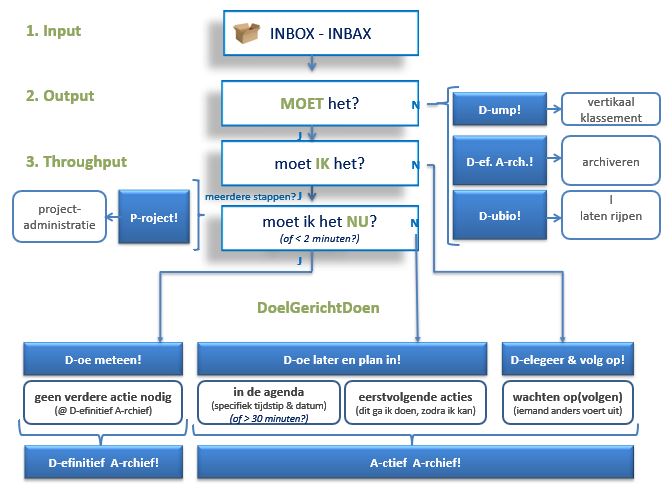
STEP 1. SHOULD IT or can't I just delete it?
practical: just press the share key and hop, get rid of it, out of your inbox!
N: your body cramped at the idea of deleting (feel in!) , don't delete it and go to step 2 .
STEP 2. DO I HAVE TO or can't I pass it on to someone else?
J : does your body feel good; pass it on to someone else, possibly schedule afollow-up date:
practical: forward the mail and then immediately remove the initial mail from your inbox or move it to where you follow up - agenda or action list - or - if follow-up is not necessary - to your archive.
N: However, your body screams cheers at the idea of passing it on, see step 3.
STEP 3. DO I HAVE TO DO IT NOW or is it possible to advance & schedule here?
practical: drag the mail with your right mouse button to your calendar icon and choose to move here with an appointment as an attachment, you will notice that Outlook creates a new appointment with the mail attached - even including all attachments! -. That way, you also remove it from your mailbox again.
N: however, if your whole being screams murder and fire, if you do that, take step 4 ;
STEP 4. just do it, just do it!
practical: has your mail been processed, delete it or drag it to your archive. It's just how you like to work. Remember: after all, your mailbox is your mailbox: it is also empty every day!
Do you have doubts? Of course, there are sometimes things you want to think about for a little longer. And for good reason! You could put this
one in doubt:practical: drag to a separate folder under your inbox that you call in doubt, or pending, or whichever way you prefer...
On the

one hand, this way of working keeps your brain free for more important work and, on the other hand, you have a tidy feeling of having done an action, you get a shot of dopamine every time. If you do this consistently, your mailbox is above... empty, empty, empty, empty, empty,... !
And... action!
- From now on, decide what to do with it for each new mail or incoming task: from your inbox and into your organizational system - agenda, folder... or however you work -.
- update: do the same for your emails from the past few weeks.
- For anyone older, possibly create a folder to process mail, where you drag the past emails to, out of your inbox.
You as a manager?
- how do you deal with your incoming tasks and emails? Do you still have an overview?
- Who in your team is already dealing well with this?
- What could be the next step towards even better?
Want to know more?
How to set the right priorities:
- be busy like a headless chick: set goals & take steps
- kiss the prince, eat the frog: do the most important or difficult thing first..
How to follow up:
- waiting for Godot: how to follow up structurally and practically ?
- waiting for Godot: how to follow someone up in an understanding but task-oriented way?
- waiting for Godot: how to start a follow-up and how do you follow EVERYONE?
How to keep your head cool and free:
- help... my head is a flickering Christmas tree: write down & centralize!
- archive, archive, whoever does their best will learn: keep an active and permanent mail archive!
- If you have a nice anecdote or question about this, send me an email!
- If you find this interesting, forward this blog to a peer below.
- If you want to score yourself on time competencies, fill out your self-scan!
- If you want to get to know the whole method, read the book GOD - Goal Oriented Doing.
One life, live it, love it!
- If you have a nice anecdote or question about this, send me a message!
- With the FORWARD button below, you can share this blog with a peer.
- If you want to score yourself on time competencies, fill out your self-scan!
- If you want to get to know the whole method, read the book GOD - Goal Oriented Doing.
One life, live it & love it!
Your time profile + immediate advice?