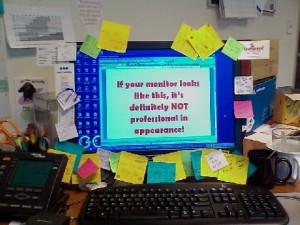
Georgette asked to call back, does someone call you when you come back from the toilet. Gosh, soon you'll stop by the Delhaize for pimcakes while you're working. Will you throw in that Peter Outhepants file later, your chef asks between nose & lips... At best, you write it down quickly on a note and suddenly your computer screen looks like the picture. If this goes on for a bit longer, you'll have to do mountaineering every morning before you can get to your desk.Great if you're in a creative mood, something chaotic if you want to keep an overview. Preferably keep everything in one place, read more about it in cleaning up for an overview, a view over!
Head empty, system full!
In any case
, you're already doing really well! You read that in holes in your memory cheese: write down!
This can be done in your inbox/inbox: you can let Outlook ensure - without having to send an email to yourself - that an electronic post-it ends up in your inbox.
How does EDA do in Outlook?
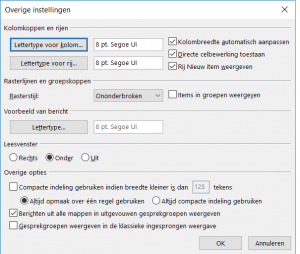
In your inbox, right-click on the mail bar - which includes the Subject - and choose display settings at the bottom, go for other settings and check the Allow direct cell editing cell cell cell cell, then choose Show new item row.
View the new item row ensures that from now on, when you click here to make a Note, you can... uh... post a post-it in your inbox, right?
The allow direct cell editing cell cell means that you can change a mail subject/add or remove text in your inbox without having to open the mail. Pretty handy and brought along right away!
NOTE: this trick can be determined by mail folder!
But what if you're on the road somewhere? And not sitting in front of your computer?
To do this, read what you don't want to forget, straight to your inbox: easy and quick apps!
And action!
What are you waiting for? Where are you waiting, what are you waiting for, what are you waiting for
?Adjust your Outlook right away, try to calm your mind and keep that same head clear for more interesting things and tasks than remembering.